NEXUS DESKTOP / 1.4.31

Your next level.
On your PC.

Your games, your controller, your community. Bring OldGames to your desktop with one connected launcher.

Windows 10 / 11 · x64 · 857 MB

NEXUS // PLAY STATION01—04
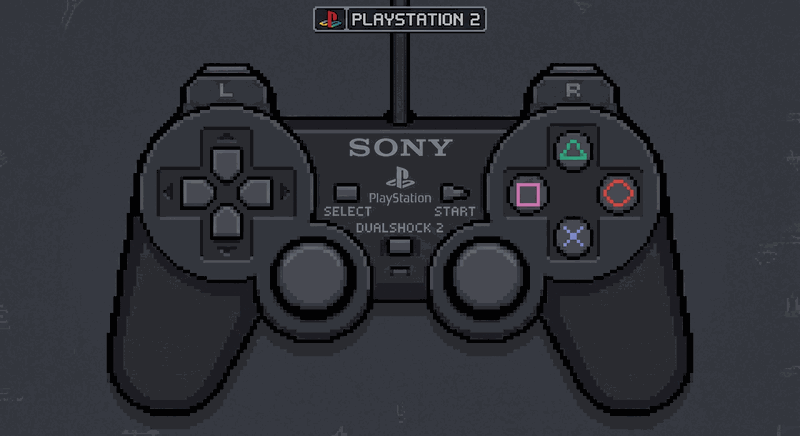
PlayStation 2 controller

Stay in the game

Native gameplay inside the launcher, with your library and console settings close by.

Make every button yours

Automatic profiles for recognized USB and Bluetooth controllers. Click the console's controller image to remap buttons.

OldGames Live

Your gameplay streams automatically to the community. Turn it off at any time with the top-left OldGames Live switch.

NEW IN 1.4.30

Your emulators, ready to play.

A complete download

Programs and cores are included for all 32 systems. Settings have visible close buttons. RetroArch detects compatible USB/Bluetooth controllers automatically and offers manual mapping.

Play from the website

Inside the launcher, catalog Play buttons open the matching native emulator. Same-site links stay inside the launcher.

PS3 ISO support

Readable PS3 ISOs are extracted automatically on first launch. RPCS3, firmware and the complete game folder are prepared locally.

Optional community integration. RTX 50 keeps the tested original model; RTX 20/30/40 use the experimental community variant, which still needs testing on your PC. It can reduce FPS, especially on RTX 20/30. This is not native DLSS support in every game.

CHOOSE YOUR SYSTEM

32 systems. One library.

All 32 systems include their native emulator or core, with portable settings and the available BIOS and firmware. Choose a game from the website or open a local ROM.

EnglishPortuguêsEspañol

English on first launch. Change the language whenever you want.

PlayStation 2PCSX2

PCSX2 and PS2 BIOS included.

GameCubeDolphin

Keyboard and controller profiles.

WiiDolphin

Controller profiles and advanced motion settings.

Nintendo 3DSAzahar

Keyboard, controller and touch input.

See all 32 supported systems

All listed emulators and cores are included. Compatibility and performance depend on the game and your PC. Some titles require additional console data or a matching arcade ROM set.

  • PlayStation 2PCSX2
    Included in the download
  • GameCubeDolphin
    Included in the download
  • WiiDolphin
    Included in the download
  • Nintendo 3DSAzahar 2126.1.1 · OldGames Wireless
    Included in the download
  • PlayStation PortablePPSSPP
    Included in the download
  • PlayStationDuckStation
    Included in the download
  • Nintendo DSmelonDS
    Included in the download
  • Nintendo Entertainment SystemRetroArch · mesen
    Included in the download
  • Super NintendoRetroArch · snes9x
    Included in the download
  • Nintendo 64RetroArch · mupen64plus_next
    Included in the download
  • Game BoyRetroArch · gambatte
    Included in the download
  • Game Boy ColorRetroArch · gambatte
    Included in the download
  • Game Boy AdvanceRetroArch · mgba
    Included in the download
  • Mega DriveRetroArch · genesis_plus_gx
    Included in the download
  • Master SystemRetroArch · genesis_plus_gx
    Included in the download
  • Game GearRetroArch · genesis_plus_gx
    Included in the download
  • Sega 32XRetroArch · picodrive
    Included in the download
  • Sega CDRetroArch · genesis_plus_gx
    Included in the download
  • Sega SaturnRetroArch · mednafen_saturn
    Included in the download
  • DreamcastRetroArch · flycast
    Included in the download
  • PC EngineRetroArch · mednafen_pce_fast
    Included in the download
  • Neo GeoRetroArch · fbneo
    Included in the download
  • Arcade · FinalBurn NeoRetroArch · fbneo
    Included in the download
  • Arcade · MAMERetroArch · mame
    Included in the download
  • Namco System 12RetroArch · mame
    Included in the download
  • Sony ZN-1RetroArch · mame
    Included in the download
  • Capcom Play System IRetroArch · fbalpha2012_cps1
    Included in the download
  • Capcom Play System IIRetroArch · fbalpha2012_cps2
    Included in the download
  • Capcom Play System IIIRetroArch · fbalpha2012_cps3
    Included in the download
  • Atari 2600RetroArch · stella2014
    Included in the download
  • Atari 7800RetroArch · prosystem
    Included in the download
  • PlayStation 3RPCS3
    Included in the download

READY WHEN YOU ARE

From download to play.

  1. 01

    Download and open

    Download the Windows .exe and open it. No installer or setup wizard.

  2. 02

    Connect your account

    Sign in with email or Google, or create a new account. Your existing website account works here.

  3. 03

    Choose a game and play

    Click Play to download and launch a catalog game automatically, or choose a local ROM without downloading again.

Before you download

Windows 10 or 11, 64-bit, and an internet connection for account access and online features. Game performance depends on your PC, emulator and game.

Emulators and cores are included: PCSX2, Dolphin, Azahar, PPSSPP, DuckStation, melonDS, RetroArch and RPCS3. RetroBat is not required. Games download when you click Play. Updates preserve your library and saves.

OLDGAMES LAUNCHER 1.4.31Download portable .exe
Verify your download (SHA-256)725b521aa491d6c30ec33d59ebe698d32a6981ac13de04315b6218a7e99df65d